Saturday, February 15, 2014

Real world experience--Comparison Matrix

School Garden in Disarray

From the first month of school when we began studying plants, the students have just soaked up all the information that has been taught and they continue to ask questions and question each other about plants. They also realized that the school grounds had a garden that was in disarray. It had not been planted for some time and was mainly overgrown.

We decided to do something about it. They wanted to plant the garden. Now, what kind of plants would be the perfect plant? They wanted to plant tomatoes. I then bought different tomato seed packets and the students had to decide what seeds would be the best to plant for our school garden.

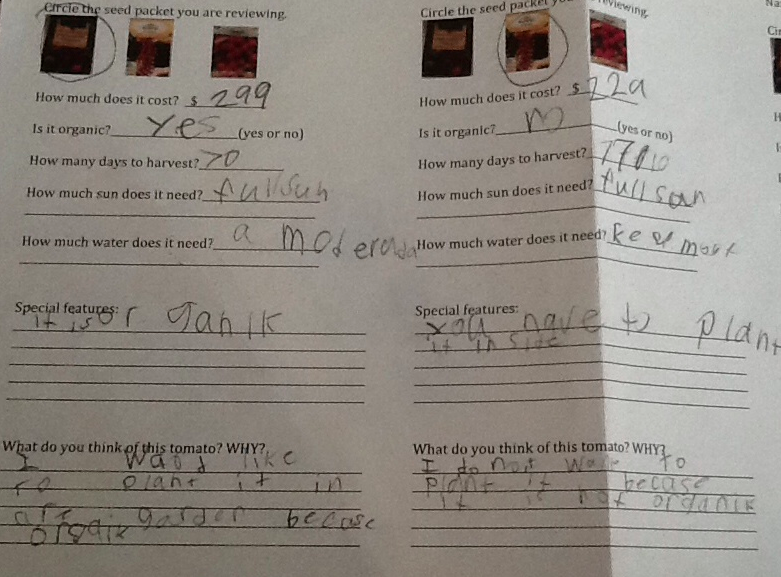
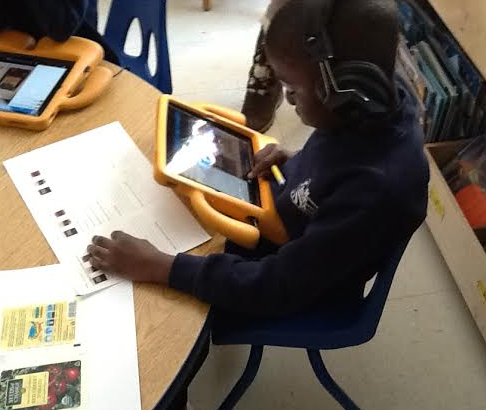
It would have been easy for me to pick out seed packets and have the students plant them. I decided to let them make that decision. I bought 3 different kind of tomato seed plants: an organic tomato, a heirloom tomato, and a very inexpensive seed plant. The cost of the 3 seed plants ranged from $0.59 to $2.99. I created a video (using Doceri and then uploaded to Dropbox) for each seed packet that read the front and back side of the seed packet for the students. I underlined and circled different information on the seed packet. This allowed all students to have access to this information, even though students with limited reading ability. I also copied the front and back side of the seed packet for students to reference. I created a worksheet that had the different criteria to make the decision of the best tomato plant. They were cost, organic or not organic, amount of sun, amount of water, and special features.


The students then listened to each video and identified the criteria information for each seed packet. I also included information on the sheet for them to make judgements about the different seed packet.

All students were engaged in this activity. I think I would assign students different seed packets to listen to or at least start listening to. I found that some students could listen to all three in the same amount of time it took other students to listen to 1 or 2. Because of this, when we went to complete the comparison matrix, not all students could participate in sharing information of all seeds. But I didn't really know who had information about which seeds and called on some students who had information about all three and then I had to call on them again when they were the only ones who had information about the last seed packet. I would have liked to include more students in each seed packet sharing.

On the next day of instruction, we sat on the rug with our informational sheets and filled in the comparison matrix together as a class. Once the comparison matrix was filled out, students did a Think Pair Share with a small group of students. (I do not do pairs but rather triads or quads for richer discussion opportunities.) Students then had opportunity to get up in front of the class and try to influence their classmates in choosing a certain seed packet.

Then they had to vote for their seed packet and explain the reason(s) why for their choice. The concept of organic was one reason that influenced decisions as well as cost factor and what I call marketing (words like tasty and juicy). We then are planting the seed packet of choice.


Thursday, January 16, 2014

Kindergarten students blogging

Three days ago my students were introduced to blogging, using the Kidblog app. It is one of my new favorite things and now theirs too!

I think their blogs and comments on each other blogs speak for themselves! Here is one of my favorites about Macarena's goal for 2014 and her classmates response. Macarena blogs "My goal is to be at school every day and on time."

Corene comments (below) "Wow, I ges you want to ern the i pad" ("Wow, I guess you want to earn the iPad." She is referencing an attendance incentive we have at school).
Ella then comments (below) "Maybe you should wake up early."


The students are really excited to read each other's posts and then comment on them. One of my student's parents came up to me and told me after school that she asked her son how the field trip was. He said, "Read the blog." She prompted again. He said "You can read my blog to find out." She read the blog and commented on his post.

I truly believe that the power of peers promotes strong academic improvement and achievement. Students want to perform for and like their peers. When I use the iPad or introduce new apps, my focus is on higher order thinking skills (Blooms) and peer interaction. I know this focus is paying off because academically students are making large (bigger than normal) gains per quarter.

Here is some information that I have learned while beginning kidblog. Hopefully this will help you too.
1.  Currently, I must approve all comments that are made by students or adults. I can also choose to trash it, edit it or unapprove it if needed based on content. Right now, I want to make sure the students use the blog appropriately so having the control over this feature is really nice.
2.  The teacher can edit the students' blogs. I do not change the content and I let the students write phonetically but I have added the topic of the blog if it is not written in. I may change the spelling of one or two words if the word is sounded out incorrectly and makes it difficult to read. I am not changing words because of spelling but rather for students to understand other's writing.
3.  For children to read a child's blog they have to click on the title (topic) of the blog. This can be difficult if the screen is very small. I have taught them to increase the size of the screen and showed them how to click on the topic.
4. When giving access to the parents, I gave them instructions to write their username as child's mom or child's dad (i.e. Carrie's mom, Carrie's dad, Carrie's grandma, etc.). The username is what is seen by the students and if parents use their first names, the students will not know who is commenting on their blog. You have the control to edit their names if need be.
5. I have had students comment on the teacher's blog. For example, I asked the students a question from our social studies unit, "What traditions do you follow in your family?" Then the students responded to my blog through writing a comment. OR. I also have given the students the topic written on the board and they blog independently (not comment) on their blog. They retype the topic and begin their blog. Other students then comment on their blog. So there may be 28 blogs with the same title.

Sunday, January 12, 2014

Same Test-Different level of Students-Ensuring all students can do their best!

The math test! How do you give a math test to all your students without dragging it out for those students that can quickly complete any task or for those students who just need to take their time to get it right? What about those students that can read and understand every word? What about those students that can't read the math test completely and you know that you can be testing reading on the math test?

Well, a video is the answer! We created a video that focused on each question. The video is created on the Doceri app but the Educreations app would work as well. We read each question and the multiple choice answers (where applicable). We taught the students how to pause and work the problem and then touch play when they were ready to go on. This provided students the ability to work at their own pace. My residents and I went around to the different tables of students as they were working. At times, we provided moral support and assistance. This also allowed my two students that were absent to take it without my assistance or reading of the test when they returned the next day. It allowed me to continue instruction for the rest of the class. This video can be used year after year as well.

So we checked and/or graded all the tests.

Here are the results. Each question is listed and the students that missed the questions or did not complete the question. We found that some students didn't complete the whole problem. A few students answered the first part of the question and not the second part. I wanted the students to complete each problem before grading the test.


 Now I need to go back and make sure each of those students finished the test. This could take a long time to individually call or pull in small groups for a few missing questions.

We also noticed that some students made simple errors that were not characteristic of their previous work and knowledge of math. Some students made errors that we wanted to go back and reteach. I planned the day after the test to go back and reteach what the students missed. BUT, I didn't want to reteach to students that did not miss that concept. It didn't make sense to do a whole class reteach when not every student needed the reteaching. I wanted to target JUST those students that needed assistance with each concept.

Therefore, I created individual videos for each child. Here you can see dropbox where all the girl's videos are located on folder B. The boy's videos are located on folder A. (The only reason they are located on two different folders is to make it easier for students to find their names; i.e. find their name out of 14 names compared to 28 names.)


The students then went to their own video and listened to their personalized video. The videos had the following purposes:
  • Reteach specific concept(s)
  • Guide them to finish a question(s)
  • Explain how to tackle a problem
  • Teach students how to exceed expectation (and not just meet the standard) on specific questions
Each student had the opportunity to work with me (via the video) and to reteach and learn something they had missed or didn't know.

4 examples of videos

I found that this helped the students with the concepts that they had missed or did incorrectly. We saw results in future math work that the students did.

Even though this was a lot of work creating videos for each student, I really BELIEVE this was the best thing to do to meet each student's individual needs. The videos ranged from 1 minute to a couple of minutes.


Sunday, November 17, 2013

Students at different levels--assessing what they know


Like in all of our classrooms, we have many students at many different levels. They have different strengths and different weaknesses. They know different things. How do we assess what they know? I find it a very overwhelming task to be able to sit with each child (that 28 this year!) and have them explain their work. Instead, they can actually explain their work to me all at the same time. I still sit with the students and listen to as many as I can while they are actively doing this activity and I come back to the lesson if I need to with individual students. We are able to listen to what they recorded and that student can add or explain their thinking to me. They use the app Educreations. I have talked about this app many times and it is one of my favorites. In this activity, the students were identifying their every day needs. We were learning about needs and wants in this unit. The three children below are at different levels.

Leilani-Things I need
Claire-Things I need
Macarena-Things I need

Because of the way I have linked up educreations, the students are also able to listen to each other and learn from their friends.

Sunday, October 20, 2013

Close Reading in Kindergarten

With the new Common Core Standards, I feel like my discussions with my colleagues echo around my school building, my city, my state, and my country. How does this look? How do I make sure the students are using text evidence? How can I get little students (kindergartners) to do this too.

Here is one of my close reads. I think I had done lessons in the past that were close reads, yet I never called it a close read. I read text multiple times and we really went in depth at the text. Now that I have to do a close read I sometimes feel like I am not as confident.

I used the book Beatrice's Goat by Page McBrier and Lori Lohstoeter. It is a story based on a true account of Beatrice Biira, an impoverished Ugandan girl whose life is transformed by the gift of a goat from the nonprofit world hunger organization Heifer International.


My essential question of the story is "What did the goat mean to Beatrice and her family?" On the first day, I decided to give some background knowledge so my students could understand where Beatrice lived and how she lived. I had a powerpoint of what Uganda looked like where Beatrice lived and how they lived. I chose to do the powerpoint and have a brief discussion to compare and contrast how Beatrice lived and how they lived because even though my students attend a school where 95% of the students receive free or reduced lunch, they do not experience the poverty that Beatrice experiences. This was also evident when I read Those Shoes by Maribeth Boelts and they did not understand the meaning of the duct tape on the shoe of one of the characters. 

We began reading the story and the students used their iPads and educrations to "take notes" while I was reading. They drew pictures, labeled pictures, and wrote words that were important to the story. I stopped at every page or every other  page for the students to finish what they drew. I had the students record while I was reading.  They will be able to review their work prior to discussion and still listen to the story and see their work. 

Here are a few examples. I was not able to finish the book in the first reading. It took us two days to read the whole book. They took notes on both days.


On the third day, I reread the story. The students had the opportunity to relisten to the educreations note taking so they reviewed what they had found important in the story. I had multiple questions that they had to use to break down the story. Then we focused on the essential question: What does the goat mean to Beatrice's family?

Here is the transcript of the discussion. It was presented similar to a Socratic Seminar (as close as we could get for the first time and doing this with kindergartners). The students all wrote sticky notes of what the goat meant to Beatrice as the exit slip.

Beatrice’s Goat Transcript
Teacher: On page 8, it states that she will never have enough money to go to school. Why does Beatrice think this?
SH: She didn’t have Magisca so she didn’t think she would have enough money.
ER: She didn’t have Magisca and Magisca was part of the way that she earned money.
MC: The goat produces milk.
Teacher: Can you elaborate further.
MC: She sells the milk.
Teacher: Anything else.
MC: She sells the milk to make money so she can go to school.
CB: I agree with MC because when she has Magisca she has more money.

On page 9: Mama says we will get a goat. …. Mama says “Good things take time.” What does it mean when Mama says good things take time.
KS: It means it takes time which means it take a little while.
Teacher: Why does it take time for good things.
KS: It takes a while.
SH: I think Beatrice wanted the goat and she wanted to take care of it.
MP: It takes time.
Teacher: I think this question could be tripping us up so let’s look at the question. Mama says “Good things take time.” What are the good things that they are talking about?
ER: Money so she can go school.
JN: The opportunity to go to school and to learn and to get smarter.
LF: Things take time and they can arrive some day.
Teacher: So what things could arrive?
LF: Other stuff that they can get from different countries.
Teacher: What opportunities did they get from other countries?
LF: They didn’t get anything.
Teacher: So what did they get.
LF: They got a goat
Teacher: Ella said that goat gave us money so Beatrice could go to school.
CM: The goat provided them with money so they could get a new house.
MUB: The goat provided them with a new roof.

Teacher: So let’s go back to Why she longed to go to school.
NW: She wanted to learn.
AnS: She wanted to flip the book.
Teacher: Can you elaborate on what you mean?
AnS: She wanted to turn the pages. She wanted to read.
Teacher: Can you elaborate on what it means to be able to read?
Ans: It will make you smarter.
MP: She wanted to sit on the bench.
Teacher: Give me more details.
MP: She wanted to learn to read and to learn.
PM: She wanted to go to school.
Teacher: Why did she want to go to school?
KK: She wanted to have fun. She wanted to learn to read books.
MUB: She wanted to learn to write.
JN: She wanted to go to school so she could learn to read.

Teacher: What does the goat mean for Beatrice’s family?
Write on your sticky note what the goat means for Beatrice’s family.
LG: So you can’t write it in Japanese because some people can’t read it.
AG: Time.
Teacher: What do you mean time?
School.
Shelter.
Food.
Milk for her family.
Teacher: What does the milk provide them?
PM: The milk provides them with energy.
MM: It provides them with a pet.
Teacher: What does it mean that they have a pet?
MM: They feel happy to have a pet. They love their pet. They feel happy about Magisca.
AdS: Money and Milk.
KS: Milk for the family.
LG: Provides them 2 milks.
Teacher: What do you mean about that? Can you elaborate.
LG: It gets them really healthy.
Teacher: What is the other?
LG: I don’t know.
MUB: School
MC: Money and milk. The money is used for school.
LG: To bring the old house down and to get a new house. So the roof won’t leak.
ER: Milk, money, a new house and school.
DB: Money
LS: A new house. The goat provided them a new house.
AL: More money so they could do things with it.
CB: Giving milk to others.
Teacher: What does that provide?
CB: Giving it to others.
Teacher: Where are those people?
CB: People in the village.
CM: It gave them more money for a new roof. It provided them a dry place.
LF: Gave them good stuff.
Teacher: What is the good stuff?
LF: Good stuff so Beatrice could live.
CL: Money to buy a new house.
Teacher: What else?
CL: School
MP: Milk, money and a new house
SH: The goat provided Beatrice with a school. It provided her with another goat which she sold for money.
KK: House, food  and milk.

So it provided them with opportunity the family with many opportunities. If they are healthier what is going to happen to them?
They are going to get healthier and they will grow up.
It helped people in their village  get healthier too.

What do you think happened to Benane when his family got a goat?
SH: The same thing.
MUB: He will get to go to school, to learn.
LG: His family will get healthier. They will get a new house too.
End of transcript

At the end of the discussion, we watched the video (edited for kindergartners) of the interview on CBS with Beatrice. It really brought the story to life for the students. They really loved the story and they made connections to other stories we had read and how they see poor people living in their city.

Tuesday, September 24, 2013

Two digit addition in kindergarten? Well, yes!

What do you do when you have 10 kids in your kindergarten class that have mastered addition and subtraction facts to 18 and yet some students have never seen a plus or minus sign and know limited numbers? Well, you differentiate! However, being 28 places at once is not easy. I still need to teach the basics of number concept to 10 too.

I made a video for these students that need to start 2 digit addition. I needed to make sure they understand the concept place value first. Then I can go from there by teaching them to add 2 two-digit numbers and eventually regrouping.

Here is the video. Nothing fancy and easy to make. I referenced the straws that we use in our calendar math as well to tie in the "old" piece with the "new"piece. This is made with an ipevo camera and quicktime. Don't be intimidated. They are super easy and fun to make and you can use them year after year.


Sunday, September 15, 2013

Introduction to taking notes in kindergarten-using text evidence

Today when I read the nonfiction text from the FOSS Plants kit, I had a set of students model how to take notes during a read aloud. This text was about 5 pages long about what plants need to survive. On each page I had one student draw. I gave some guidance. We did talk about what we should put on each page after this educreations recording.

Model taking notes on educreations

Then I had the students all get their iPads and I reread it while they drew on their iPad on the rug.

Saturday, September 7, 2013

Students teaching tally marks

As promised, I am working on students creating more and not working on so many learning apps.
On the 8th day of school with only two days of tally mark instruction and practice, the students created their own videos (using Educreations) teaching their friends about tally marks.

Student A teaching tally marks

Instruction began with a pre assessment about tally marks. Only one child really demonstrated that they had any previous background with tally marks. There was a mini-lesson about tally marks. Students worked on educreations (used as slates) to make tally mark that was stated by the teacher. On the second day of instruction, students played a dice roll tally game (EM). Homework on the second day was to teach your parents how to do tally marks with a reminder to use their words and the number 1-10 listed on a page. All students brought the page back with the correct tally marks listed on the page. On the third day, the created these videos. This homework was handed out as a reference for the students. I do not believe students used it though (or I didn't see any of them use it).

This is also a great opportunity for me to assess their knowledge of tally marks.

For student A--this child wrote 3 as a reversal and 4 and 9 incorrectly. The student incorrectly wrote 10 tally marks wrong. I can see how they made their mistakes through the video. If it was a pencil-paper task, I know that it is just incorrect but not what they did and how they counted the tally marks.
I am also sending the links to their parents.

Student B teaching tally marks

For student B--this child wrote no corresponding numbers, just tally marks. It is very jumbled but you can clearly see that he is making the tally marks correctly and even has to redo 6 as he makes 6 marks and forgets to cross the 5 and then fixes it. Obviously, we can work on the "jumbled" tally marks but he clearly understands how to make tally marks to 10.

Student C teaching tally marks

For student C--one can quickly see the child's error for numbers 6-9. This is a short mini lesson to fix. Interestingly, this is the one child that has previous knowledge of tally marks. Did my mini lesson give him this misunderstanding?

Encourage Reading - Real World Commitment

Just found a great resource from one of my student's parents (who is a librarian!). Here is the link:
We Give Books. This is an organization that gives books to children all over the world. They have free books that can be read online. No cost. Anyone with a device can read these books and get books into the hands of children. Every time you read a book online, they donate books to children. They have a cause each season and this seas is JumpStart.


I was thinking of incorporating this website with Real World Commitment for my students. How can they help make a difference?

I am interested if anyone else has integrated real world problems into their classroom.


Monday, September 2, 2013

New School Year--New Common Core Standards--New Planning

After taking a hiatus, I am back and ready to blog in full force. I attended some great iPad conferences and presented at some too this summer and am excited about the new school year. I am planning on blogging with my students full force. I will join Twitter Tuesdays at my school as we tweet with other classrooms. I am also committing to have my students do more creationary apps, like iMovie and Book Creator. Stay tuned as I dive in to these new exciting adventures.

This weekend I spent much of the sunny days inside and working on planning for the new school year. I have two residents (like student teachers) this year which I will take with me on my teaching journey for the year. They were probably enjoying the sunny weather. With all this planning going on, I didn't want them to miss out on my planning. Therefore, I actually thought out loud and recorded it for them and my colleagues.

I am teaching a new curriculum as my kindergartners embark on an accelerated curriculum. Here is my planning of my first quarter of social studies. It is integrated with literacy. The one thing I will change is the progression from family to school community to city community. I am not going to do city but rather neighborhood. This will be more powerful for my kindergarten students and offer rich opportunity for students to share with their classmates where they live. The students do not live in school boundaries.

Social Studies Unit Plan-Family and Communities

Because I am changing city to neighborhood, one of the family projects is for students to take a walk with their families in their neighborhood taking pictures of different stores or businesses. They will email me the pictures or print them out and bring them to school. Students will determine the neighborhood's needs and wants. They will report this information and then share out with the class.

I was able to order a free map of the neighborhoods by a local real estate agent so we can reference their neighborhoods on a map.

I am excited about this plan and hope to increase the project based learning in my classroom. Stay tuned for more.


Saturday, April 13, 2013

Writing about Unfertilized Egg (farm unit)

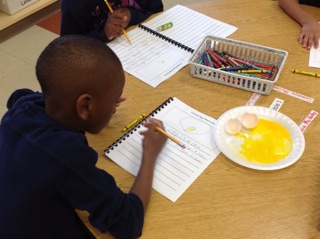
We wanted to teach the students about different types and reasons for writing, so as their writing during the farm unit they will be writing in a book titled, “My Farm Book”, which is essentially a writing journal for each student. The first entry in their journal was labeled “Cracked Egg Observation”. The student’s observed/touched a cracked egg so they could see what the embryo ate to keep growing while in the egg. I explained that once the egg yolk was gone, the baby chicks would be ready to hatch! I was really impressed by their observations! Below are some student examples. 

Tuesday, April 9, 2013

Semantic Feature Analysis Chart and learning about chicks (farm unit)

So yesterday, (previous blog), we completed an open sort or classification of different pictures that could be found in the city and/or country. The students really gave great rationale for why certain pictures went with each other. They came up with 5-6 different ways to sort this.

I am blogging about this activity today, even though it does not use the ipad and technology, because the discussion with kindergartners was so rich and deep. It really allowed the students

Day 1-Introduction to farm
Open sort/classification country/city pictures
Read Country Kid, City Kid by Julie Cummins


Chart-Similarities between city and country
Writing integration-Where would you rather live, city or country? Justify your answer with supporting sentences.

Day 2-Chick egg introduction (I would not always do this activity on the second day of this unit, but the live chick eggs arrived today and so it is important to introduce them, explain and show the incubator that will be in the classroom for the next 21 days.)

In our morning meeting and letter to the students, I wrote the sentences "How does the hen nurture the growth of the chick? How can we nurture the growth of the chick?" These questions were the guiding questions for the students as I read the story. I read a book about chicks. (I have about 15 different ones and most tell the life cycle so all can work).

I introduced the semantic feature analysis chart. (see picture).


I had prewritten the focus question "What does a fertilized egg need to hatch into a chick?", the left column (hen and incubator), and the lines for the chart. During the reading, the students had opportunities to discuss the chicks and how they growth. We then completed the chart. They came up with the features on the top of the chart.

When we came to food, that is when the discussion really began. One child talked about giving the chick corn (as stated in the book). However, the chick does not eat corn when in the egg. They were trying to figure out how the chick gets food. I facilitated the discussion. I then drew the eggs at the bottom explaining that one day 1, the chick is in the egg. What do they eat? On day 2, the chick is in the egg. What do they eat? On day 3, the chick is in the egg. What do they eat? All the way to day 21 when they break out of the shell and then can eat the corn. The students came to the conclusion that what is in the egg is what the chick eats. Eventually the students stated that the yolk was the food (which is correct). It was such an exciting discussion as the students are working to figure out how chicks eat because you need food to survive. We had to add egg underneath the incubator to the chart. We continued our discussion and the students came up the feature shelter. Again, the students realized that the egg shell protects the chick.


Monday, April 8, 2013

Individual video for Fixing Misunderstandings

I had a couple of students that did not do well on the word study assignment given to them. It can be hard to spend the five minutes (or less) needed to fix misunderstandings and check comprehension of the task with 25 other children in the room.

So I made an Educreations lesson designed just for them. They watched this video lesson prior to the word study activity. My intest of the lesson was to give them additional strategies (in this case, arm blending) when they sound out each word. I believe they were sounding out each word but with arm blending they can better isolate the sound they need to focus on. I went over each picture or word with them and practiced the strategy with them. I then took a picture of their word study activity from the day before and I went over their work with them, focusing on the errors they had made. Then I took their iPad and created the educrations video on their ipad. I gave them a picture of the educrations app so they knew they have a video to watch.

http://www.educreations.com/lesson/view/jalen-c-fix-it/6187130/


http://www.educreations.com/lesson/view/willie-fix-it/5863446/


These 2 minutes that I used to prep was so valuable because the students got their individual help and my word study lessons could continue. I did this for 4 students on this day (total of 10 minutes of prep time). The students next activity or repeated activity (depending on the child) was successful.

Open Sort Classification Activity

Our staff has been participating in critical thinking continuum PD for the last quarter. One of the sessions focused on open sort classification. So, we are beginning a farm unit. Initially, my teaching partner and I were planning on having the students do a open sort on the ipad individually. They would download the pictures from Dropbox on the Educreations app. The students would sort the pictures and record their reasoning/rationale of their sort. At the last minute, we changed our mind and decided to do the open sort/classification activity as our Do Now. Well, my Do Now took 20 minutes and the students were completely engaged. They came up with multiple ways to sort these objects. It was amazing.

Attached is the educreations activity we did together. I projected the pictures on the screen. I moved the pictures and wrote the words. I also repeated what the students said so all could hear and any audience listening/watching would be able to hear as well.

http://www.educreations.com/lesson/view/classification/6679829/


Upon reflection, the value of doing this activity as a whole class is amazing. I don't think I would get these kind of answers if the students did the activity by themselves (actually I know I wouldn't). I would get the one way they sorted it. I think possibly by having some groups, there would be more of a chance to get this same kind of discussion and critical thinking by the students. I am glad that this was a whole activity. I am excited to do the next one.

The key to the open sort is that there are multiple ways to sort. The squirrel and then I added the children quickly at the last moment (instinctually) technically fit in both farm and city sorts but made the students really defend their answers and explain their rationale for where they put each object.

Sunday, March 10, 2013

4 Word Study Groups-1 Teacher

Well, just my luck! I lose my voice for 3 days. Diagnosis: laryngitis. I have two residents so they helped alot but I still needed to do word study and guided reading groups.

Solution: iPads. I wrote scripts for my husband (who is not a teacher) and he read and recorded them while I wrote on Doceri what I wanted the students to do. The students listened to the movies they uploaded from Dropbox. I didn't have to sync to each iPad and each group listened to the movie.

Based on previous experience, I uploaded the exact movies in another folder on Dropbox because you just never know when a student might "accidently" delete a movie.

This is actually something I will use when my residents leave and still have 6 guided reading groups and 4 word study groups. I can still have instruction daily with each group using the iPad.

Here are the videos I had him make:

Monday, February 25, 2013

Exit Slip--Coin Names and Values

We are working on counting coins--right now just nickels and pennies. First, the students are given a cup of coins (pennies and nickels) and a felt mat. The felt mat is used to silence the coins. This really makes a difference as the students are counting coins in quiet voices.

When done with the counting coins activity, the students did an exit slip on the iPad. They used Educreations app and then used Dropbox to upload a picture of a penny and a picture of a nickel. The students than were asked to identify the coin and the value of the coin. In the past, I had to go to each student to ask them the name and value of the coins. This was so much quicker.


http://www.educreations.com/lesson/view/wynter-coins/5258519/

Other activities I do to practice counting money is a toy store or snack shop. I have little toys (pencils, erasers, tattoos, and other toys) for the students to buy. I give them a cup of coins and they have to count out the right amount of money to purchase the different toys. These toys they can actually keep. They have to read the price of the toy, find the right amount of money needed, count it aloud to me, and then keep their toy.

Wednesday, February 13, 2013

Story problems--Students explain their thinking

We have been working towards having students complete story problems and explain how they got their answer on the iPad. This allows us, the teachers, to be "right next to each student" while working the problem. I may not be able to actually sit by each student but I can address their misunderstandings and great thoughts afterwards through a video or sitting one-on-one with them by learning what they did while working the story problem.

We took baby steps to get there. I think the first step is to have them talk into the iPad. Initially, they were hesitant. We are still working on making sure all 100% of the students are talking into the iPad, they are recording and saving their work, they are doing the work expected from them, and the noise level in the classroom is conducive to recording multiple children at the same time.

For this activity, we used Dropbox (my new favorite app) for the students to get the written story problem from. I would change the the story problem so it fits on 2 lines. If the students weren't careful, the story problem did not fit great on the screen. So by making sure it fits easily, then the students can upload the story problem and start without asking for help. (Independence!). The students then read the story problem and draw a picture and writte the number sentence and explain how they got the answer. This was the expectation articulated to them. We provided the word "story" for them to save it. The rest they did on their own.

Here are some examples of students who completed the number problems on their own. (We also had a group of students who worked with the teacher as well).

Breonna actually did all the work and then explained how she did it.
http://www.educreations.com/lesson/view/breonna-strop/4875897/


Katelynn did most of the work and then wrote the number sentence while recording. She is starting to use some transitional words in explaining the math.
http://www.educreations.com/lesson/view/katelynn/4875872/

Charles talks us through how he did the problem, though he doesn't write the number sentence.
http://www.educreations.com/lesson/view/charles-story/4875745/

Monday, February 11, 2013

Rhyming sort

I have really got on board with Dropbox as a quick way for the students to do a picture rhyming sort. I got the sort pictures online and just took a screen shot. I correlated the rhyme with one that is covered on MAP testing (NWEA).

I have a file of different pictures for each rhyme. I am doing more than a rhyming pair as I think the students are quick to find the pair and then do not look for other pictures that match.

I upload all the pictures into Dropbox. The students click on each picture (labeled a, b, c, etc) and then sort the pictures. The students do this on Educreations and record for a second (some do it a lot more) and then save their work.

Here are some of the students' work, screenshot from Educreations:


All the students received this sort but I have also had different students go to different folders, marked A, B, C and then download the pictures in that folder which are designed for them. This is one way I can differentiate this activity for the students.

Equivalent Numbers

We are learning about equivalent numbers in kindergarten to support the lessons at the end of the year in Everyday Math and the first grade lessons about number boxes. We are trying to find different ways to represent our "magic" number. This is the first time the students had participated in the activity. I did it on Educreations projecting it on to the board. It was a whole group activity. The students are able to see me write AND this group of students seem to be active participants when we are doing iPad stuff.

The next steps are for them to do this activity on the own with different numbers.  I think I could use Dropbox to upload the template or they can probably make their own as well.

Here is just an insert of the whole lesson:

Equivalent numbers-whole group activity

Sequencing activity with Educreations

The students had listened to A Story A Story for the unit on African Folktales. The activity was to sequence 6 pictures of the story. Instead of giving them 6 copied pictures and having them put them in order (glue on sentence strip), the students used Educreations app and Dropbox. They went to Educreations and then clicked the Dropbox and upoaded each of the 6 pictures. They had to resize the pictures and then put them in order. Having put them in order, we had the students write the number order near or on them.

Hint: Make sure the pictures that are in dropbox are uploaded out of order. If you put them in order, then when the students upload them, they will be in order too. It is harder to tell if they knew the sequence of the story or not.

The students then push the record button for a few seconds and then turn it off and save their work. They know to write their name and then we have a white board area where they look to see what to save the work as and type in that too.

Here are the screen shots of the educreations.


I did not need to take any paper sequencing sheets home to look at. I did not need to copy 6 pictures for each child. I looked at the sequencing while walking around the room observing but also did it that night on my laptop.